 Ntwine
Time limits
Give a thread a deadline, and it plans for the best result it can hand over by then.
A time limit tells a thread when it needs to be done, like "go until 3:30". Ntwine keeps track of it for you: the agent knows the deadline and plans around it, and the board shows how much time is left.
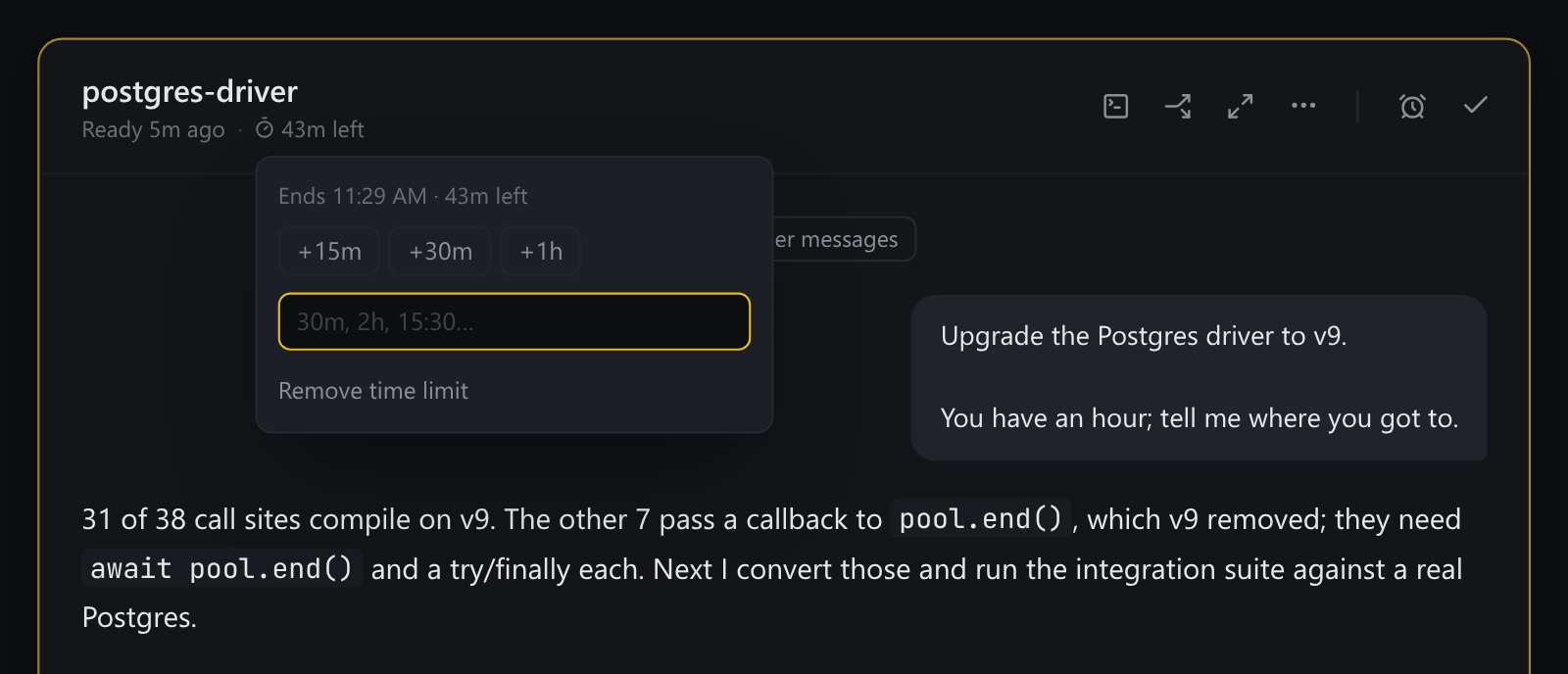
Setting one
The stopwatch beside the model in the prompt box takes a duration or a clock time, like 2h, 45m or 15:30. A duration starts counting when you press Enter. To add one to a thread that's already running, use Time limit… in its ⋯ menu.
What the agent does with it
The agent is told the deadline and what it means: the job is the best deliverable it can produce by then, not the complete one eventually. It plans so it has something to hand over at any point, and Ntwine reminds it as time runs down, more firmly near the end.
A sub-agent it starts gets a share of the time that's left, ending before its parent's so the parent can fold the result in.
On the board
The card and the thread's row count down (42m left). The countdown stays quiet while there's plenty of time, turns amber once 80% of it is gone, and turns red once it's over. Click it to extend the limit by 15m, 30m or 1h, set a new one, or remove it.
Running out
Running out never interrupts a turn, because stopping an agent mid-edit would leave your tree half-changed. The limit is enforced by what the agent is told and by the board showing it's over time. You can still stop it yourself.