 Ntwine
Schedules
A recurring prompt you write the way you'd say it.
A schedule is a prompt plus a recurrence. On each run, Ntwine starts a fresh thread in the schedule's project with that prompt, and the result lands in the queue like any other thread. There's no date picker. You just write the schedule in words.
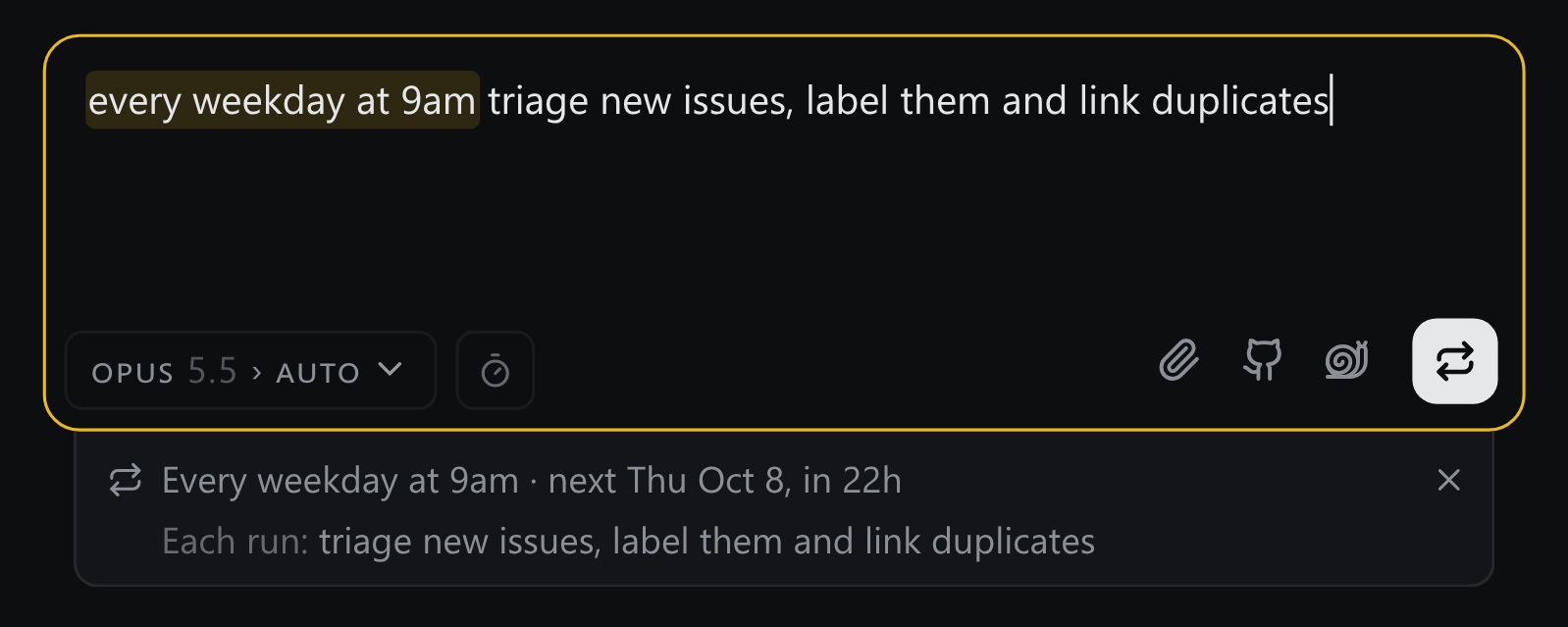
Writing one
Type it into the prompt box like any other task:
every weekday at 9am triage new issues
first weekday of the month bump dependencies
When the box sees a schedule word like every, daily, weekday or Monday, it reads the schedule as you type. Before you press Enter, it shows the rule it understood and when that rule next runs. The phrase it read is marked in your text, and the send button turns into a repeat sign.
Didn't mean to write a schedule? Press × or Esc, and Enter starts an ordinary thread. "Fix the bug from this morning" never turns into one.
Ntwine turns your words into a calendar rule and computes every run itself, so what it shows you is exactly what it will run.
Each run
The next run waits in Snoozed, and the things you already do to a card work on it there. Mark it done to skip that run, snooze it to move it, or send it to run it now. Each run opens with a header saying which schedule started it.
If a run is still going when the next one is due, the next one is skipped instead of piling up.
Finding them
Every schedule is listed under ⌘K, and each project's row counts its own. On a phone they have their own tab. From there you can change when a schedule runs, pause it or delete it.
Asked for by an agent
An agent can propose a schedule too ("triage new issues every Monday"). It won't run until you turn it on.