 Ntwine
Projects
Every folder you add gets its own board, and one server runs them all.
Every folder you add becomes a project. Ntwine is a single server: one on your machine serves every project. Running npx ntwine again joins the server that's already running instead of starting another one.
A board per project
Each project has its own board at /project/<name>. It shows the project's threads under the five named bands, its cards beside them, and a prompt box that starts threads in it. A working thread's status shows when you point at it, and its sub-agents are listed under it. npx ntwine in a project opens that project's board, and a bare http://127.0.0.1:9393/ opens whichever view this browser showed last.
The switcher above the prompt box moves between projects and counts each one's queued and running threads. ⌥↑ and ⌥↓ step between projects from anywhere, and ⌘K jumps to any of them.
All projects
All projects, at /all, is the first choice in the switcher. It lists every project with its in-flight threads underneath, and every waiting card beside them. The two are never interleaved. Each row still shows its band by its mark: a pin, a rest time or a spinner.
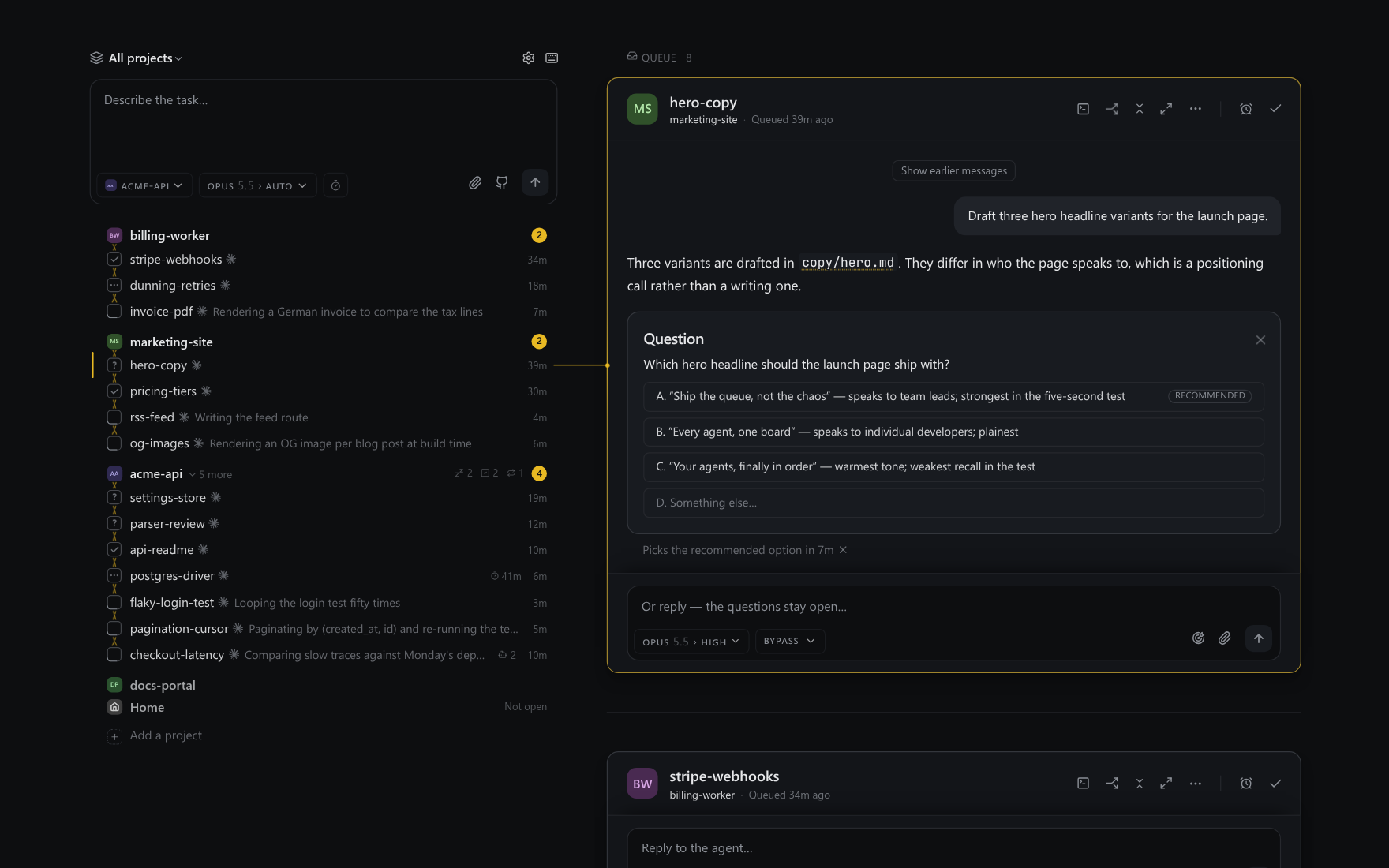
A project's snoozed and done threads show as small counts on its row. Click one to list them in place. Click the row itself to fold the project away, and drag rows to reorder projects.
Project sidebar
If you want every project in view, turn on Settings → Project sidebar. It adds a column of project icons down the left edge, each with its queue and running counts. Click an icon to open that project's board. It's off by default.
What becomes a project
Running npx ntwine never creates a project on its own:
- In a folder that's already a project, it opens that board.
- In a repository (
.git,.jj,.hg,.svn), or a folder with apackage.json,pyproject.toml,go.mod,Cargo.tomlor similar, it asks whether to add it, and adds it once you confirm. - Anywhere else, it opens All projects.
Add a project, under the project switcher's list, takes any folder. Your home folder is never a project.
Home
Work that doesn't belong to a project yet, like cloning a repository or asking a question about your machine, starts in Home. It's the last choice in the project switcher, and its agents run in your home folder.
Project instructions
A project's instructions are its NTWINE.md, which is injected into every thread. You can edit them from the agent settings beside the model picker. They're saved to the repo root, so they can be committed and reviewed.
State lives outside the repo
Everything durable, including threads, settings and logs, lives under your user directory and never in your checkout. The only thing Ntwine adds to a project is a .ntwine/ folder holding per-thread scratch directories and a few small state files.